
Most UK business owners I speak to are not short on ideas for AI automation. They can list ten things they’d love to automate before we’ve finished the first coffee. The problem is that those ideas are often built on a few assumptions that sound sensible, but lead to projects that quietly die after a week or two.
That’s not because AI is useless. It’s because automation is a process problem before it’s a tooling problem. AI can accelerate the work, but it can’t replace clarity, ownership, and good operational design.
This article is a practical look at what business owners typically get wrong about AI automation, how to spot the traps early, and how to choose automations that actually stick in day-to-day operations.
First, what we mean by AI automation
When people say “AI automation”, they often mean one of three things:
- Task automation where AI performs a repeatable step, such as summarising a call transcript, extracting invoice fields, drafting a first response, or classifying support tickets.
- Workflow automation where AI is one stage in a multi-step process, usually connected to systems like email, CRM, project management, a database, or a helpdesk.
- Decision support where AI doesn’t take the action, but prepares the information for a human to decide, for example a weekly performance triage note or a shortlist of high-priority leads.
The more you want AI to act autonomously, the more you need controls. Most small and mid-sized companies get better results by starting with decision support and task automation, then expanding.
What business owners get wrong about AI automation
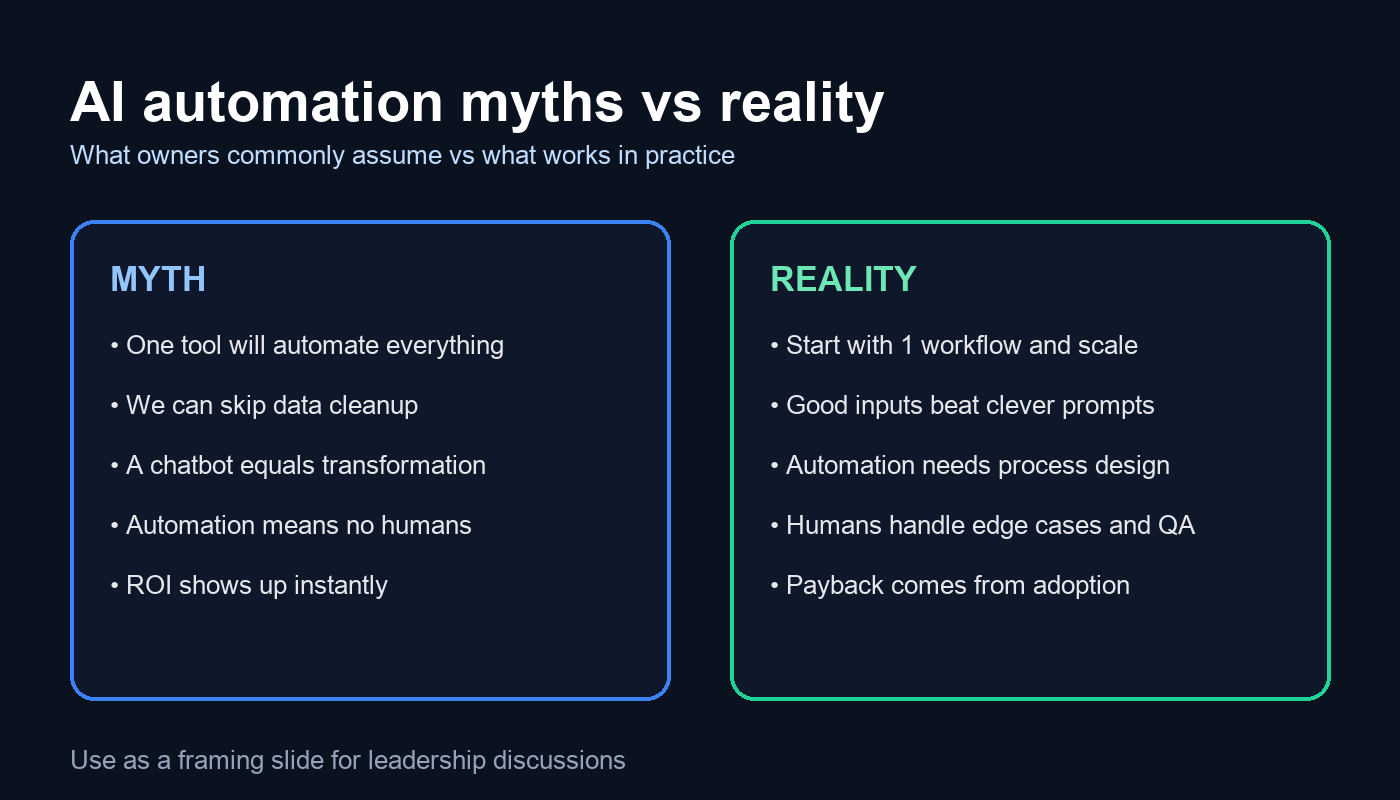
1) They assume one tool will automate everything
It’s tempting to look for “the AI platform” that will fix the whole business. In practice, the winners are companies that treat AI as a set of capabilities that can be applied to specific workflows. You might use one tool for transcription, another for CRM enrichment, and a different approach for document processing.
What to do instead: pick one workflow with a clear owner and outcome. Prove it end-to-end. Then standardise and roll out. If you want a sensible map of what’s possible, start from your services and capability plan (for example, your AI services overview) and work down into a shortlist of automations that are realistically implementable in your environment.
If you want a sensible map of what’s possible, see AI services.
2) They underestimate the value of boring data work
Most automation projects don’t fail because the model isn’t clever enough. They fail because inputs are messy and inconsistent. Customer names don’t match across systems. Product data is incomplete. Notes are free-text. Files are named randomly. The AI ends up producing output that looks plausible, but isn’t reliable.
What to do instead:
- Define a minimal “source of truth” for the workflow.
- Standardise key fields (customer ID, order ID, SKU, project ID).
- Create a small glossary and naming convention your team actually uses.
- Automate data validation before you automate AI output.
If you want a structured way to identify where data is blocking progress, an AI audit is usually the fastest way to get to clarity without boiling the ocean.
3) They treat “automation” as replacing people
Owners often pitch AI as “we can reduce headcount” or “we won’t need admin”. Even if that’s the long-term financial goal, it’s a poor way to design an automation. People hear it as a threat, so adoption suffers. Meanwhile, edge cases still exist and someone still has to handle them.
Better framing is: remove the repetitive parts so people can do the work that actually needs judgement. In a service business that means better client communication, faster turnaround, fewer mistakes. In eCommerce it often means cleaner catalogue, better merchandising, stronger customer support and fewer returns.
4) They expect immediate ROI and ignore change management
A common story is: the owner pays for an AI tool, the team tries it for a week, then everyone goes back to old habits. The tool wasn’t the issue. The missing piece was the operating rhythm: when to use it, who checks it, and how it fits into the existing process.
What to do instead: treat AI automation like any process change. Give it a weekly cadence and a named owner. Measure one or two numbers that matter, such as time saved per week, response time, or error rate. Make it visible in your team meeting for a month. That’s usually enough to form a habit.
5) They choose flashy use cases instead of the ones that stick
Chatbots are the classic example. A chatbot demo looks impressive, but a chatbot deployed without a knowledge base, policies, and escalation rules becomes a brand risk. The “boring” automations usually outperform the flashy ones.
Automations that tend to stick in UK SMEs:
- Meeting notes into actions and owners
- Drafting client updates from structured inputs
- Ticket classification and routing
- Invoice and document extraction with human approval
- Weekly reporting summaries that highlight exceptions
These work because they are repeatable, measurable, and they reduce friction rather than adding it.
6) They forget risk controls and compliance until late
If your automation touches personal data, commercial contracts, employee records, or anything customer-facing, you need a basic risk model. It doesn’t have to be bureaucratic, but it does have to exist. In the UK, you should be able to explain what data you’re sending where, why you’re doing it, and how you reduce the chance of harm.
A sensible starting point is the ICO’s guidance on AI and data protection (external link): Information Commissioner’s Office AI guidance.
Internally, your own AI compliance approach should spell out what is allowed, what requires approval, and what is prohibited.
A better way to choose AI automations
If you want AI automation to work in practice, choose projects the same way you’d choose any operational investment: outcomes first, then constraints, then implementation.
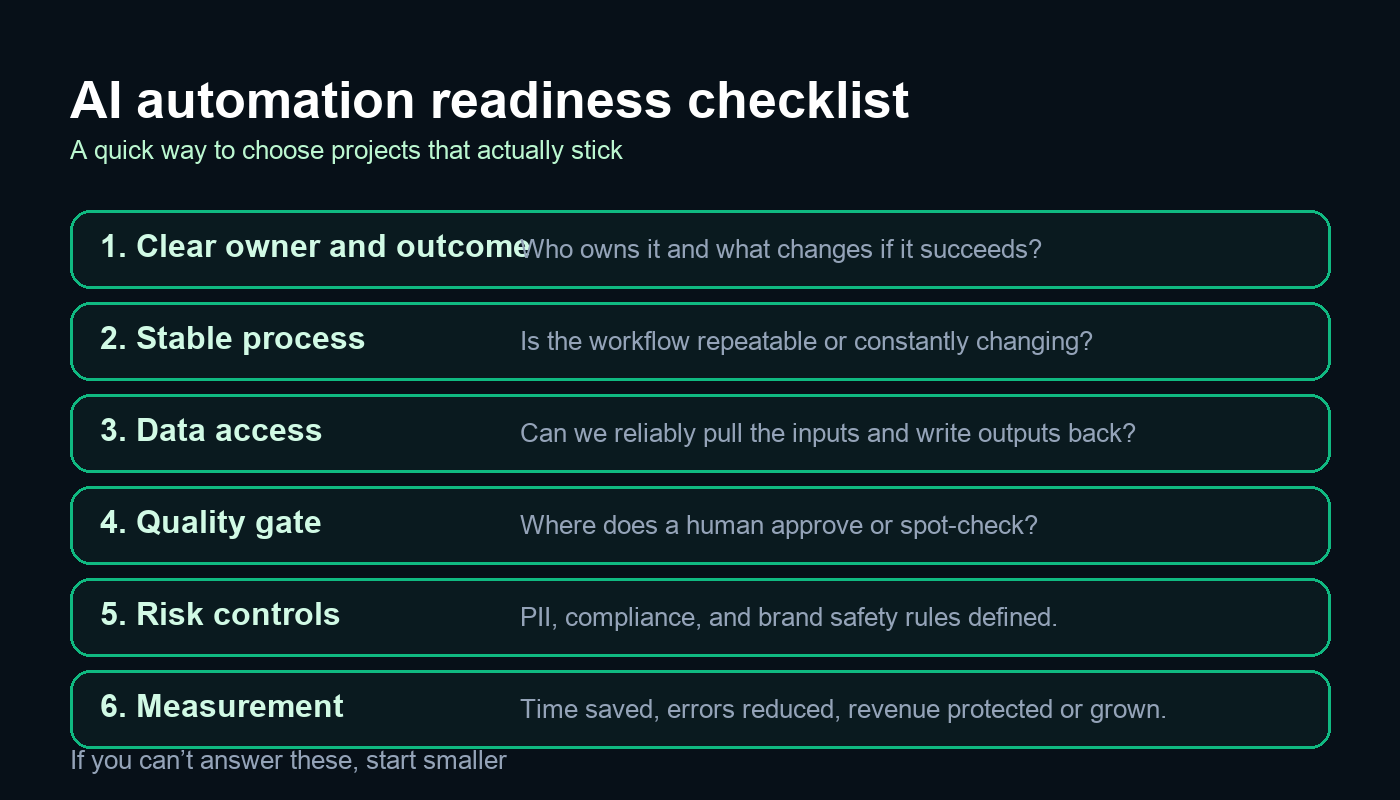
Step 1 Pick the outcome, not the tool
Examples of outcomes that are worth automating:
- Reduce the time it takes to produce weekly client reports by 50 percent.
- Reduce the time from lead enquiry to first response to under 15 minutes during business hours.
- Cut support ticket backlog by improving routing and first replies.
Once you have an outcome, the tooling choices become obvious. Without an outcome, every tool looks plausible and nothing gets finished.
Step 2 Define the process in plain English
Before you build anything, write the current process in 10 lines. Who does what, using which system, and what the handoff looks like. Then write the proposed process with AI in it. You’ll usually find the real bottleneck is not “we need smarter AI”. It’s “we don’t have a standard way of doing this”.
Step 3 Decide where humans stay in the loop
The most effective “automation” pattern in real businesses is AI drafts, humans approve. The approval step might be as light as a spot check, but it has to exist. It protects quality and reduces anxiety in the team.
Step 4 Measure adoption and quality
When an automation fails, the post-mortem is usually framed as “the model wasn’t good enough”. In practice, the measurement you need is often:
- Usage How many times was the automation actually used this week
- Acceptance rate How often did the team accept the output vs rewrite it
- Error pattern What kinds of mistakes show up repeatedly
Those three numbers tell you what to fix next.
What AI consultation looks like in practice
Owners often ask “what do you actually deliver” when they hire an AI consultant. The best engagements are not a one-off workshop and a vague roadmap. They are a short, practical delivery sprint.
A typical approach looks like this:
- Discovery Identify 3 to 5 workflows with measurable ROI. Agree success criteria.
- Audit Check data access, risks, and constraints. Map the process and ownership.
- Pilot Build one automation end-to-end with a quality gate and a measurement plan.
- Rollout Train the team, document the process, and expand to similar workflows.
If your business is small, the shortest route is often an AI for small businesses style plan that focuses on two or three high-leverage workflows, rather than an enterprise platform rollout.
Common mistakes to avoid when you start
- Automating a broken process Fix the workflow first, then automate.
- Letting “AI” own the project You still need a human owner with authority.
- Ignoring edge cases Define what happens when the automation is unsure.
- Overloading the team One automation per month beats ten half-finished pilots.
What good looks like in the real world
When AI automation works, it usually has three characteristics that look almost boring on paper:
- It removes waiting, not thinking. It speeds up the parts that block the work (finding information, drafting, formatting, routing).
- It improves consistency (fewer missed steps, fewer “depends who did it” outcomes).
- It creates a feedback loop so the system gets better (people flag mistakes, prompts and rules improve, edge cases are handled).
Owners often ask whether AI automation is “worth it” if the output still needs checking. In practice, a human quality gate is not a weakness. It’s what makes the automation deployable. The question isn’t “can we remove humans” — it’s “can we remove 60 percent of the effort and reduce errors”.
Examples that actually work in UK businesses
Below are the kinds of automations that tend to deliver value quickly, with the caveat that the details depend on your systems and how disciplined your process already is.
Professional services and agencies
- Call notes to CRM that extract decisions, next steps, and follow-up dates, then create draft entries for approval.
- Proposal drafting using a fixed structure and approved case studies, with a human check for accuracy and tone.
- Weekly account triage that flags anomalies and produces a short list of actions, rather than a long report no one reads.
eCommerce and subscription brands
- Product content QA that checks titles, attributes and policies for missing fields and inconsistencies.
- Customer support routing that categorises tickets and suggests a first reply, escalating edge cases.
- Returns insights that summarise reasons and propose product page improvements to reduce preventable returns.
Trades and local services
- Lead qualification that turns enquiry emails into structured job details and an estimated next step.
- Scheduling support that drafts appointment options and checks availability windows.
- Aftercare messaging that sends consistent follow-ups and collects feedback, while avoiding anything that feels spammy.
Cost and timeline expectations
The biggest cost mistake owners make is assuming AI automation is either “a quick Zapier job” or “a six-month IT project”. It can be either, but most useful work sits in the middle.
Typical timelines
- 1 to 2 weeks for a small pilot that drafts output for approval (for example meeting summaries or first-reply drafts).
- 2 to 6 weeks for an automation that connects into core systems and needs guardrails (CRM updates, document processing, support routing).
- 6 to 12 weeks for multi-workflow rollouts that need training, governance and measurement.
Typical cost drivers
- Integration effort (how hard it is to read inputs and write outputs back to your systems).
- Data quality (the less consistent your fields are, the more “glue work” you need).
- Risk controls (PII handling, approval flows, logging and auditability).
- Change management (documentation, training, and making the process stick).
As a rule of thumb, if the workflow touches customer-facing content or regulated data, budget more time for governance. You’re not paying for the model; you’re paying for reliability.
How to keep AI automations reliable over time
Even good automations drift. Staff find new shortcuts. Templates change. New edge cases appear. To keep the value, you need a light maintenance rhythm:
- Weekly review of outputs that were rejected or heavily edited. Update prompts and rules accordingly.
- Version control for prompts and templates (so you know what changed when performance shifts).
- Exception handling rules for “unknown” scenarios, including when to escalate to a human.
- Monitoring for obvious failures (empty outputs, missing fields, unusual spikes in error categories).
This is where many DIY attempts fall down. The first week looks great. Week three is messy. A simple maintenance loop makes the difference between an automation that becomes business-as-usual and one that becomes a forgotten tab.
A practical 90-day plan for owners
If you want to drive this personally without it turning into a distraction, a 90-day plan works well:
- Weeks 1 to 2 Pick one workflow and define success criteria in one paragraph. Assign an owner.
- Weeks 3 to 6 Build the pilot with a human approval step and basic logging. Train the team on the new flow.
- Weeks 7 to 10 Measure time saved and error rates. Fix the top three failure patterns.
- Weeks 11 to 13 Roll out to the next similar workflow and document the standard.
This approach keeps the scope controlled, makes the value measurable, and avoids the “we bought a tool and hoped” trap.
Where to start next
If you want a low-risk first step, start with one workflow that saves time every week, has clear inputs, and a straightforward approval step. If you want help choosing the right candidate and scoping it properly, your fastest path is usually an AI audit followed by a short build sprint.
If you already know the workflow you want to automate, and it needs to connect into your existing systems, that’s where AI development services becomes relevant.
And if you’d like a quick sanity check on your top 2 or 3 automation ideas, you can reach us here: contact us.